iOS Companion App#
FoldNotes is available on iPhone and iPad as a companion to the macOS app. Both platforms read and write the same .md files in iCloud Drive — edits sync automatically.
Features#
Everything you need for focused writing and knowledge management, on both platforms.
| Feature | macOS | iOS |
|---|---|---|
| Markdown editing | ||
| Headings & folding | ||
| Bold, italic, strikethrough, highlight | ||
| Inline code & fenced code blocks | ||
| GFM pipe tables & table editor | ||
| Ordered & unordered lists | ||
| Block quotes & admonitions | ||
| Tasks (4-state with due dates & priority) | ||
| Tags, backlinks & autocomplete helpers | ||
| Drag-and-drop paragraph reordering | ||
Command palette (/) |
||
Date picker (@) |
||
| Focus mode (typewriter, paragraph, sentence) | ||
| Parts of Speech highlighting | ||
| Daily notes & calendar | ||
| Tag browser & custom tag icons | ||
| Saved queries | ||
| Database views (browse, sort, group, choose columns)2 | ||
| Inspector (words, outline, tasks, references, graph) | ||
| Note backlink graph | ||
| Image browser | ||
| Drawing with Apple Pencil or finger | View only1 | |
| Global search | ||
| Themes | ||
| Custom body, heading & code fonts | ||
| Task notifications | ||
| iCloud sync | ||
| Spotlight indexing | ||
| Import (Files, Bear, Obsidian) | ||
| Export (PDF, HTML, Markdown, RTF) | ||
Unlock More with macOS#
The Mac app is built for power users.
| Feature | |
|---|---|
| Gallery view | Browse notes as visual cards in a waterfall layout |
| Task board (Kanban) | Drag tasks between status columns |
| Collection graph | Visualise your entire vault and its connections |
| Property Manager | Create, rename, delete properties; edit options; set validation |
| Inspector properties tab | View and edit user-defined properties on individual notes |
| Database view authoring | Create new views, edit filters, author computed columns, inline-edit user properties from cells |
| Templates | Create reusable note structures with smart placeholders |
| Editor-only windows | Open multiple notes side by side |
| Interactive preview checkboxes | Click task checkboxes in the preview to cycle their state |
| Version history & diff | Browse revisions and resolve sync conflicts |
| Multiple collections | Work across separate vaults and local folders |
| Import from Capacities | Migrate Capacities exports (macOS only) |
| Collection export (ZIP) | One-way export for migrating to another app or safekeeping |
| Export (DOCX, EPUB, TextBundle) | Publish-ready formats for books, blogs & archives |
| Scheduled export | Automatic collection exports on a daily or weekly schedule |
| Status bar | Live word count and inline formatting buttons |
Command-line tool (fn) |
Script your notes from the terminal |
| MCP server | Integrate FoldNotes with AI assistants and automation tools |
Navigation — iPhone#
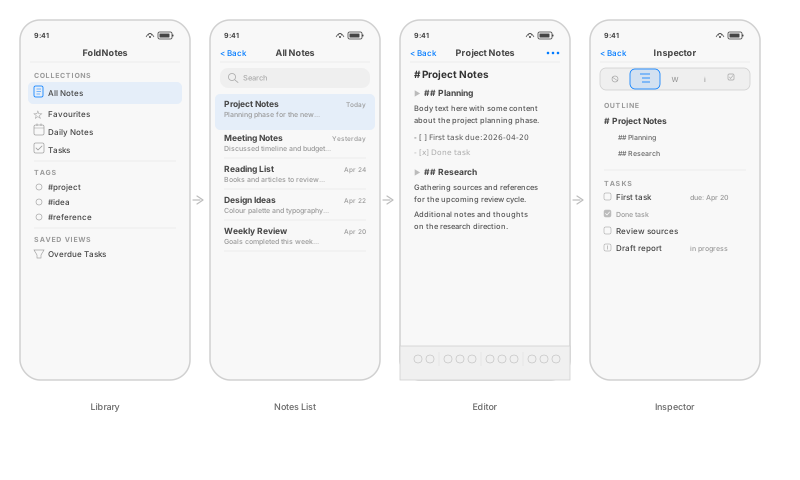
On iPhone in portrait, each area is a separate full-screen view. Navigate by tapping through or swiping back. The Inspector shows three tabs — Graph, Words, and Tasks — because the Outline and References tabs navigate to other notes, which would leave you stranded behind the full-screen inspector overlay.
iPhone Landscape#
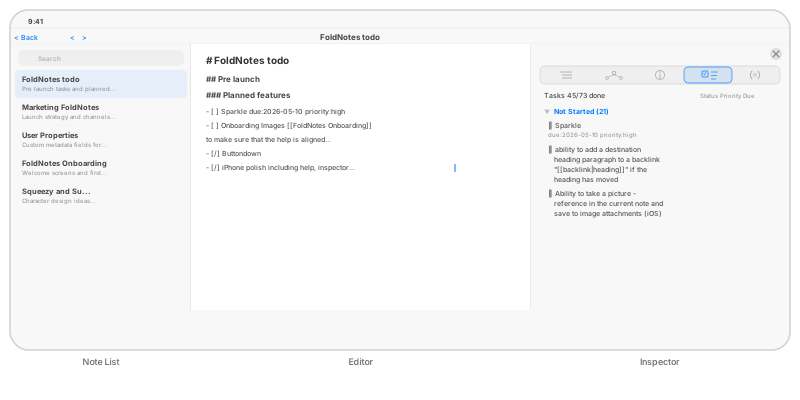
Rotate to landscape and three panes appear side by side — Note List, Editor, and Inspector. In landscape the Inspector shows all five tabs including Outline and References, since you can see the editor alongside the inspector and navigate freely.
Navigation — iPad#
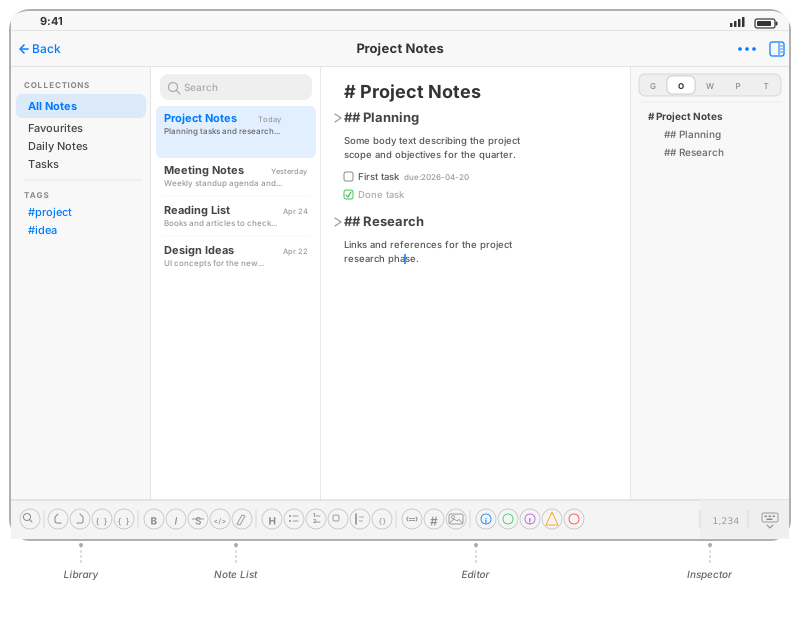
Starting from the editor, the iOS app uses a slide-out navigation pattern:
- Swipe right to reveal the Notes List
- Swipe right again to reveal the Library (collections, tags, saved views, daily notes calendar)
- Swipe left on the editor to reveal the Inspector pane
On iPad, the Library and note list can remain visible alongside the editor.
Keyboard Toolbar#
The keyboard toolbar provides quick access to all formatting and editing actions:

Button groups from left to right: find, undo/redo/indent, inline formatting (bold, italic, strikethrough, code, highlight), block types (heading, lists, task, blockquote, code block), wikilink/tag/image, admonitions, and a pinned word count with keyboard dismiss.
Tips#
- Peek at backlinks — double-tap a
[[wiki-link]]to preview the linked note without navigating away. On iPad with a trackpad or mouse, hovering also works.
iCloud Sync#
Both platforms use the same iCloud Drive container. Notes created on macOS appear on iOS and vice versa. The SwiftData cache (tags, tasks, backlinks) is rebuilt independently on each device.
If a note is edited simultaneously on both devices, iCloud handles conflict resolution — the most recently modified version wins.
-
Drawings made on iPhone or iPad appear on the Mac in the editor, in preview, and in anything you export or bind — but cannot yet be edited there, because Apple has not brought the drawing canvas to macOS. FoldNotes keeps the strokes beside the picture rather than flattening them, so drawings made today will be editable on the Mac whenever that becomes possible. Requires FoldNotes for iOS 1.1.0 or later. ↩
-
iPhone shows database views as a simplified single-column list — each note displays its title with a property subtitle beneath. iPad shows the full multi-column table with a sticky column header, horizontal scrolling, tap-to-sort, and a column visibility / reorder manager. Sort, Group By, and visible columns can be adjusted on both platforms. Creating views, authoring computed columns, editing filters, and inline cell editing remain macOS-only. ↩