Collection Graph#
The Collection Graph visualises connections between your notes as an interactive force-directed graph.
Collection Graph (macOS)#
Press Cmd+Shift+G to open the Collection Graph in a standalone window.
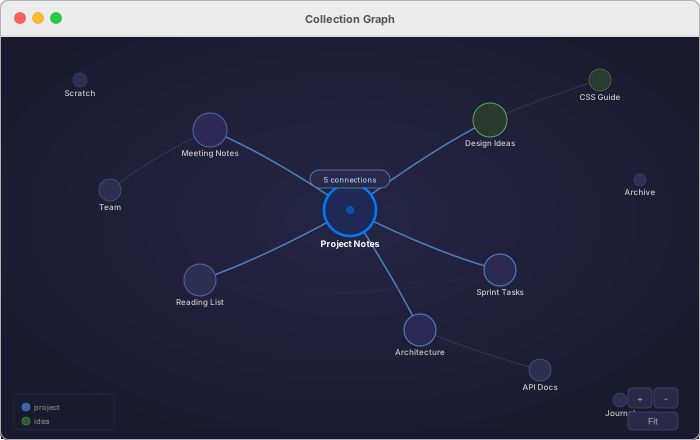
Each note appears as a node. Wiki-links between notes create edges (connections). Notes with more connections appear larger.
The graph uses a force-directed layout:
- Connected notes attract each other
- Unconnected notes repel
- The layout settles into a natural arrangement that reveals clusters
Interaction#
- Click a node to select it and highlight its connections
- Double-click a node to open that note in the editor
- Drag nodes to rearrange the layout
- Scroll to zoom in and out
- Pan by dragging the background
Local Graph (macOS and iOS)#
The local graph shows connections centred on the current note — only direct links are shown. This is useful for exploring the immediate context of a note without the noise of the full collection.
macOS — Open the Inspector (Cmd+Option+I) and switch to the Graph tab.
iOS — Tap the Inspector button in the toolbar, or swipe left on the editor to reveal the Inspector. The Graph tab shows the local graph for the current note.