Version History#
FoldNotes tracks changes to your notes and lets you browse previous versions. macOS only.
Snapshots#
Use File → Save Snapshot or the command palette (/ → Save Snapshot) to create a named snapshot of the current note. Snapshots capture the note's content at a specific point in time.
Version Browser#
Open File → Show Version History (Cmd+Option+V) to browse previous versions of the current note. The version browser shows:
- A list of saved versions with timestamps
- A preview of the selected version's content
- The ability to restore a previous version
Version history is per device
macOS stores version history locally on each Mac. If you use FoldNotes on multiple Macs via iCloud, each device maintains its own version timeline based on the edits made on that machine. A note edited frequently on your desktop may show many versions there, while the same note on your laptop shows fewer — reflecting only the edits made on the laptop.
Snapshots are also stored locally on the device where they were created.
Compare Notes#
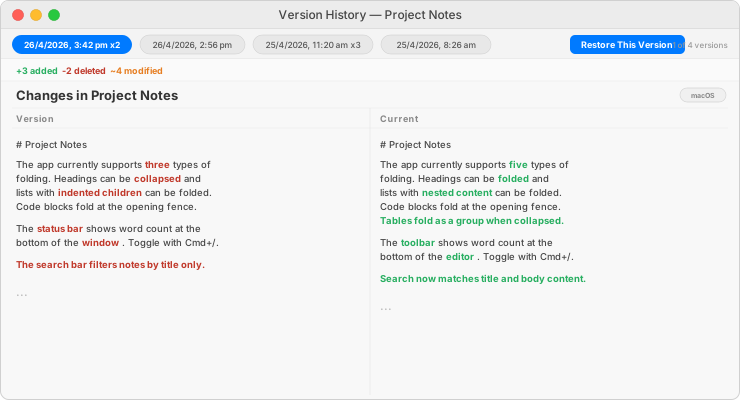
Use File → Compare Notes… to compare two notes or two versions of the same note side by side. This shows differences between the two documents with added lines highlighted in green and removed lines in red.