Task Colours#
New in FoldNotes for Mac 1.3 and for iPhone and iPad 1.6
Every colour now means one thing, on every device, wherever a task appears.
Each colour means one thing wherever a task appears: the Tasks view, the Task Board and its calendar, project pages, database views, and the iPhone, iPad and Duo. A task's colour tells you where it stands, whichever property it's showing.
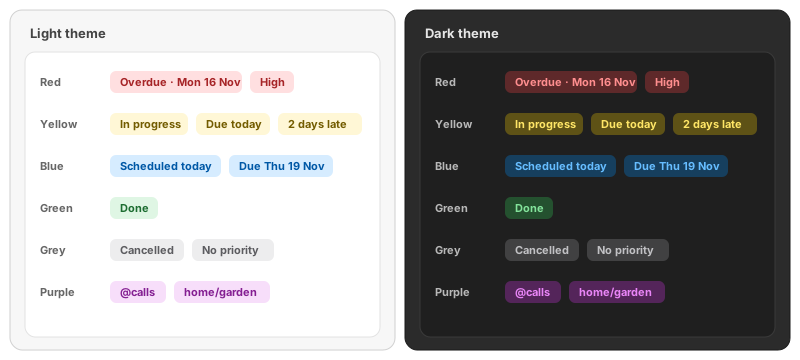
| Colour | Means |
|---|---|
| Red | Act now: it's late, or top priority |
| Yellow | Needs attention soon, or under way |
| Blue | Not yet: nothing pressing |
| Green | Done |
| Grey | No value, or cancelled |
| Purple | A label, such as a project or a context. Never a state |
Each Property's Colours#
| Property | Value | Colour |
|---|---|---|
| Priority | High | Red |
| Medium | Yellow | |
| Low | Blue | |
| None | Grey | |
| Due date | Overdue, from 5 PM on the due day | Red |
| Due soon: today before 5 PM, or tomorrow | Yellow | |
| Due later | Blue | |
| No due date | Grey | |
| Scheduled date | Scheduled, today or later | Blue |
| Late to start: scheduled for a day that's passed | Yellow | |
| Status | Not started | Blue |
| In progress | Yellow | |
| Done | Green | |
| Cancelled | Grey | |
| Labels | Project, context | Purple |
A scheduled date that's passed is never red: it's a plan, not a deadline. Only a due date turns a task red.
Where You See Them#
- Task cards, in the Tasks view and on the Task Board: each pill in its colour, and the circle in its state's colour (blue, half-filled yellow, green, or grey).
- The Library's Tasks count turns red when a task on today's list is overdue.
- The Tasks view's All tab: a note's heading shows "2 overdue" in a red pill and "1 due today" in a yellow one.
- The Task Board's columns and the calendar's chips use the colour of the value they group by.
The colours are the same on the Mac, iPhone, iPad and Duo, in every theme.
Easy to read in light and dark themes
Words in a colour, such as a pill's text or a column heading, use a darker shade of it in light themes and a lighter one in dark themes, so they stay easy to read. Dots and fills keep the full colour.
Tasks in Bike Outlines#
Tasks in Bike outlines use the same colours: to do blue, started yellow, done green, cancelled grey. A Bike row's due date turns red the day after it's due, following Bike's own rule, rather than at 5 PM.
Related#
- The Tasks View
- Tasks
- Task Board (Mac)